If you use Lunch Money, you already know the drill: transactions come in, you categorize them, check your budget, repeat.
It works. But let’s be honest… all that repetition isn’t very inspiring.
The good news? You don’t have to do it all manually anymore.
Lunch Money is now on Zapier. 🎉
If you’re already using Zapier to automate other parts of your life, you can now plug your Lunch Money account right into those workflows. This means access to over 8,000 apps and way fewer clicks in your financial routine.
What you can automate
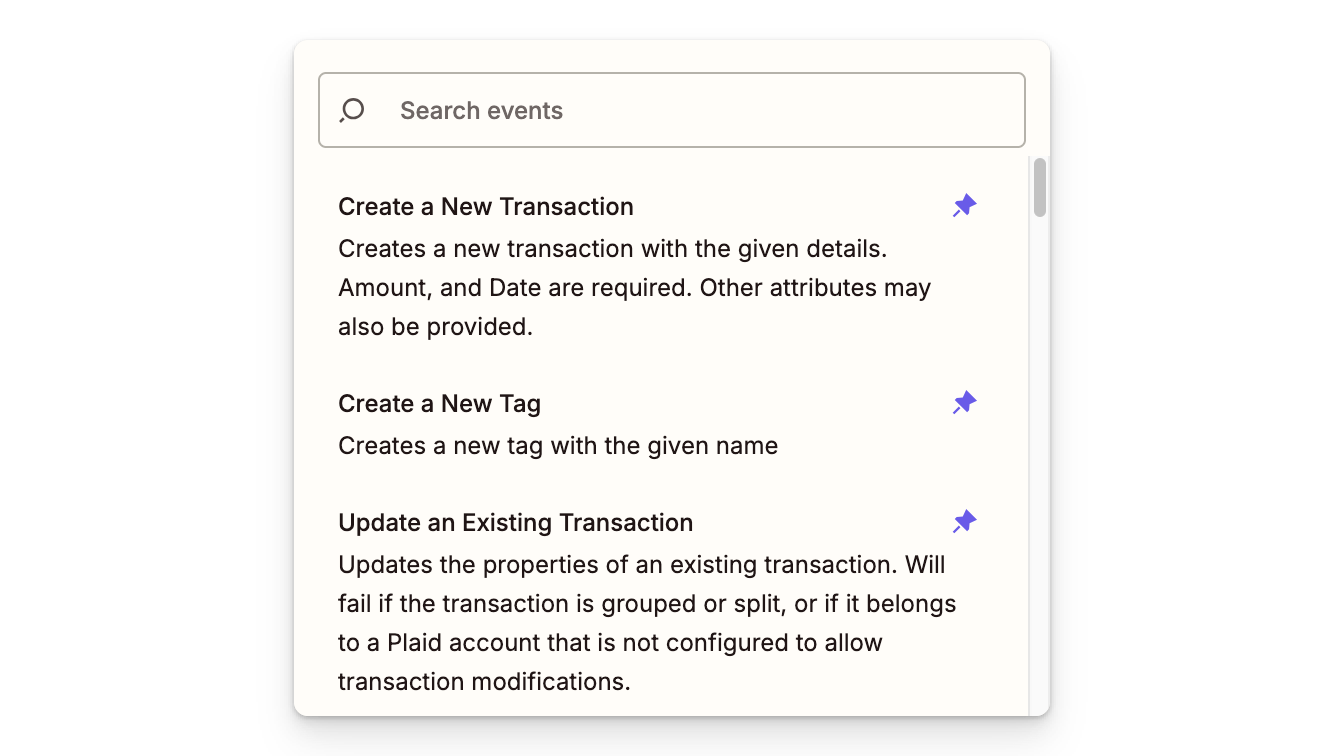
Our Zapier integration provides you with a trigger (poll for unreviewed transactions) and a full set of actions: create, read, update, and delete transactions, categories, tags, and accounts. You can also pull budget summaries, fetch recurring items, and trigger a Plaid data refresh (for synced bank accounts).
So, what can you actually do with that? Here are a few ideas to get you started:
- AI-powered transaction categorization: This one’s our favorite. We built a pre-made Zap that monitors unreviewed transactions, uses AI by Zapier to assign the best category, and updates the transaction automatically. Setup is quick and surprisingly painless. If you’ve been wanting smarter auto-categorization, this is a great place to start.
- Log transactions to Google Sheets: Automatically back up your transactions to a spreadsheet. Great if you want shared visibility with a partner or just like having a second copy of your data.
- Slack alerts for big purchases: Get a notification in Slack (or email, or wherever you prefer) when a transaction crosses a certain threshold. It’s a nice way to keep tabs on your spending without checking the app constantly.
- Create transactions from a form. Running a freelance business or a small team? Use a Google Form or Typeform to log expenses directly into Lunch Money, with no manual entry required.
These are just starting points. With 8,000+ apps on Zapier, the possibilities are almost endless.
How to get started
Getting set up is pretty straightforward:
- Generate your API Access Token in Lunch Money under Settings > Developers. Hit the “Request New Access Token” button and copy it. (you’ll only see it once!)
- Head to the Lunch Money integration page on Zapier and connect your account using that API Access Token.
- Pick a trigger or action and build your first Zap. Or start with our pre-built AI categorization Zap if you want something ready to go.
No code, scripting, or complex setup.
Built on the v2 developer API
If you’ve been using Lunch Money for a while, you probably know that we have a public developer API, and our community has built some pretty cool things with it. From mobile apps to Telegram bots to e-ink dashboards, the ecosystem continues to grow.
The Zapier integration is built on our newer v2 developer API and was developed in-house by the Lunch Money team. It’s the same API that powers the developer ecosystem, just wrapped in Zapier’s visual builder so anyone can use it (no coding required).
If you’re already building with the API, nothing changes for you. This is just an extra layer, not a replacement.
Pricing and setup details
A couple of quick things to keep in mind:
- Zapier has its own pricing: Some Zaps will work on the free plan, but more advanced workflows (like multi-step Zaps) may require a paid Zapier plan. That’s on Zapier’s side, but we want you to know this going in.
- You’ll need an API Access Token: We don’t support OAuth yet, so you’ll need to generate an API Access Token in your Lunch Money settings. It takes about 30 seconds.
Try it out
If you’re already a Zapier user, head over to the Lunch Money integration page and see what you can build.
And if you come up with a workflow you love, share it in our Discord. We’d genuinely love to see what people come up with.
Happy automating! 💛