Remember our big AI tools roundup from a few months back? It got quite the reaction! Some of you were hyped about the possibilities, while others raised (completely valid) concerns about data privacy.
Let’s be clear about our commitment: Lunch Money will never share your data with AI systems, and any AI-powered features we introduce will be opt-in only.
This month, we’re excited to spotlight something that bridges both points of view — an MCP server that brings powerful AI capabilities to your financial data while keeping everything local and private. It’s the kind of innovation that makes us proud of our community.
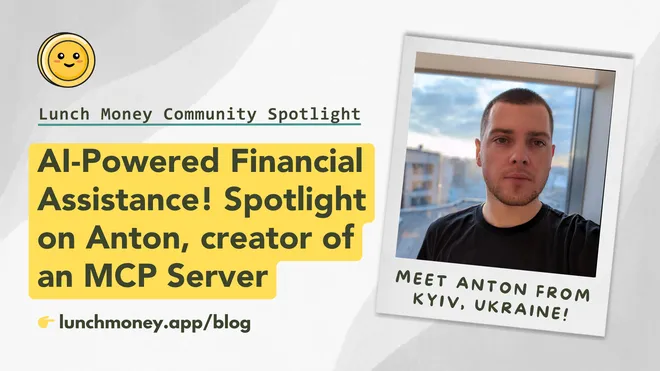
This month’s spotlight is on Anton, creator of an easy-to-use Lunch Money MCP Server, from Kyiv

Q. Hi Anton. Please tell us a bit about yourself. Where are you from?
Hi! I’m Anton, and I’m based in Kyiv, Ukraine. I work as a Salesforce Tech Lead at a consulting company specializing in Salesforce services and products.
My tech path was unconventional — I started as a freelance graphic designer and began my programming journey about eight years ago with no prior experience. I really enjoy it and do it in my spare time as a hobby. I also spend time automating various tasks and experimenting with game development in Unity.
Q: How did you come to start using Lunch Money?
After trying to manage my finances in an Excel spreadsheet, I quickly realized I needed a dedicated tool. I don’t recall exactly how I discovered Lunch Money, but I believe it was through one of those “top 10 personal finance apps” lists on the internet, around 2020.
One of the main selling points for me was Lunch Money’s developer API. Like many in Ukraine, I use the Monobank banking app, which also happens to have a very handy API. I immediately thought of integrating the two.
Not long after I started using Lunch Money, I wrote a simple Python script to import my Monobank transactions. Over time, the script grew into a dedicated Deno web application that I now use 99% of the time to import transactions. All I have to do is open the app, select a Monobank account, choose the date range, and click import.
Besides transaction imports, I mainly use Lunch Money for budgeting and reviewing my spending. One of my favorite things is using Claude’s artifacts to visualize my budget and transaction data. This makes it super easy to analyze spending trends and category breakdowns over time.
The MCP server takes this even further by making the experience more conversational, with fewer clicks and more flexible ways of interacting with the data compared to the web interface.
Q: For our readers who might be unfamiliar, please explain what an MCP Server is and the specific capabilities your Lunch Money integration provides. I’m curious to know if this can only be used with Claude or if it can work with other AI products.
A Model Context Protocol (MCP) server is basically a way to let AI assistants connect to outside tools and data. Think of it like a bridge that helps AI talk to APIs, databases, and other services in a safe and consistent way.
My Lunch Money MCP server supports everything in their developer API. So, instead of writing code, you can just ask questions about your budget or managing money using plain English.
Right now, Claude Desktop is the most prominent MCP client, but any other AI tools that support MCP can also use my server.
The entire project only took a few hours to build. Once I could use natural language to check my budget or review transactions, it felt way easier than using the regular website.
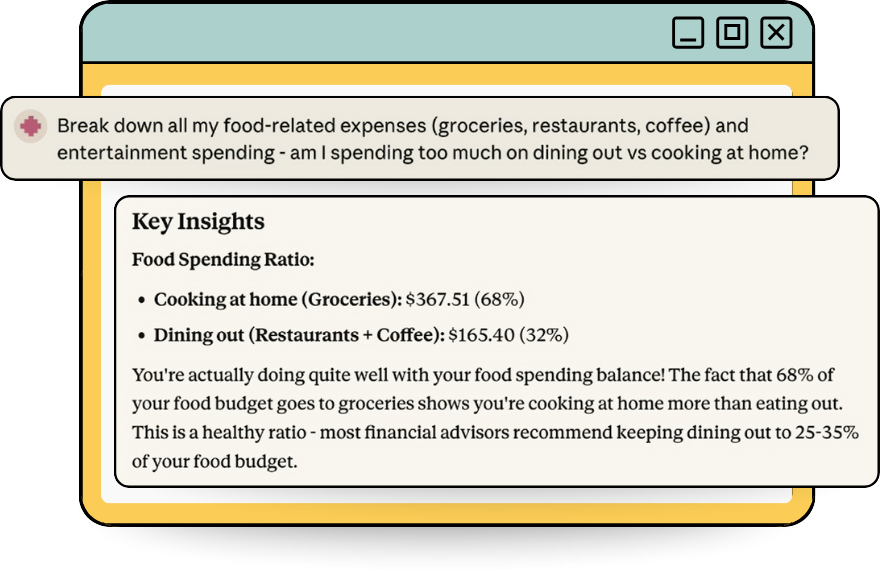
Q. We’ve seen several users create Lunch Money MCP Servers. One of the standout features of your project is its accessibility to non-programmers. What’s the easiest way for someone to get up and running with your MCP server?
The easiest way is to install a DXT extension into a supported client, such as Claude Desktop, which is designed specifically for non-programmers. Here’s the complete user journey:
- Download the .dxt file from the latest release on Github.
- Open Claude Desktop → Extensions → “Install Extension”.
- Select the downloaded file.
- Enter your Lunch Money API token when prompted.
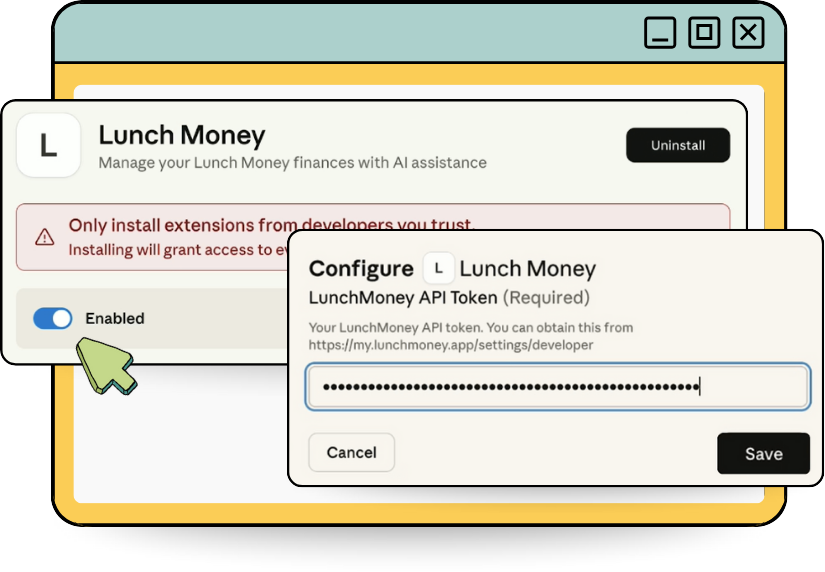
That’s it. After this, you can ask the AI to do just about anything that a developer could do using the API, without needing to write any code.
Q. We know financial data privacy is a top concern for many users. How would you address someone’s hesitations about using an MCP server with their Lunch Money API key and financial information in general?
The MCP server runs locally on your machine and acts purely as a translator — it doesn’t store, cache, or see your financial data. Your API token stays on your device and can be revoked instantly any time. Also, the entire codebase is open source, so you can verify there’s no hidden data collection. Your financial data flows directly between Claude and Lunch Money’s servers. Every API call is sent directly to Lunch Money using your personal API token.
Q: What did you learn as you built this tool? Is there anything that you’d like to ask the community for, such as feedback or contributions?
I would love to hear any feedback and am open to contributions from the Lunch Money community. I’ve actually created several other MCP servers since this one. I really love this new technology and the possibilities it opens up for making everyday tasks more conversational and intuitive.
Thank you for this contribution, Anton! I was really impressed by how easy this tool was to use.
After downloading your DTX, I asked Claude if I had any uncleared or uncategorized transactions, and it quickly found them, suggested categories, and updated them, all in about 30 seconds!
🎉 Finally, to keep up with the growing buzz around AI tools in the Lunch Money developer ecosystem, we’ve launched a brand-new AI Tools channel in the Lunch Money Discord community!
Lunch Money x FinCon: Recap
Another amazing year at FinCon is in the books, and what a difference a year makes!
We kicked things off with some much needed core team time in Portland. Since we’re spread across three countries, chances to hang out IRL are rare, so we made the most of it! Two days exploring the city, great food, and our first trivia night together (11th out of 26 teams– not bad! 👏).

Then came a special reunion with our extended content and social team, who we first met at last year’s FinCon. We shared a big team dinner and celebrated how far we’ve come together.
We also got to catch up with some friends at other indie personal finance companies — ProjectionLab and MyBudgetCoach. We swapped lessons, brainstormed, and celebrated each other’s wins. We’re so grateful for these friendships and the community that makes the journey all the more rewarding.
Oh, and did we mention our big announcement? We officially unveiled the Lunch Money Coaching Certification Program, and the response was incredible! We can’t wait to connect our users with amazing financial coaches who know Lunch Money inside and out.
Get on the Waitlist for Free Financial Coaching!
Do you ever wish you had a financial coach to help you stay on track? You’ll soon have that opportunity, with the launch of our new Lunch Money Financial Coaching Program in mid-to-late-November.
Lunch Money is partnering with trusted financial coaches who have been trained on the foundational and advanced features of the Lunch Money platform.
To celebrate the kickoff, we’re offering two hours of free coaching with someone currently going through certification! If you’re interested in working 1:1 with a financial coach, you can join the waitlist here:
If you’re a financial coach, this is your chance to grow your business alongside a trusted platform. We’d love to hear from you!
Connect with us on social media! 📱
If traditional budgeting feels overwhelming, the bucket strategy might be the simple reset you need! 💡
Check out the latest YouTube video from Lunch Money financial coach Jacob Wade to discover a simple budgeting strategy that will help you gain control of your finances by getting ahead on your expenses.

We’d love to connect with you on social media. Find us on the following platforms:


Latest from our blog! 📰
Think vacations have to break the bank? Think again! 🌴 Our latest article shares 15 smart tips to make your next getaway affordable without skimping on fun:
Do you have a story or idea? 💭
We’d love to feature more community stories in our newsletter!
👉 Do you have an interesting story about using Lunch Money that you’d like to share? Have you built a cool app, plugin, or tool you’d like to share with the Lunch Money community? Are there topics you’d like to see us explore in future issues of the Community Newsletter?
Please reach out to JP by email at jp@lunchmoney.app!