We’ve all been there: staring at something we want, doing mental math, wondering if we’re being responsible or reckless. This month, discover how one community member solved this dilemma by creating a tool that uses your Lunch Money data to plan out big purchases and test different financial scenarios.
This month’s Community Spotlight is on David Childs, the creator of Projected Cash Flow, from Pennsylvania!

Q: How did you come to start using Lunch Money?
I’m a former Microsoft Money user… yes, that old! 😊 It had this one feature I loved: a button that let me add potential transactions to my budget timeline. This was especially helpful when I wanted to see if I could afford something I probably shouldn’t buy. Back then, money was tight, and I was focused on making ends meet while supporting my growing family.
After trying different options, I eventually found Simplifi. It offered a great interface and a nice projected cash flow chart. But it didn’t have that handy button I loved so much. Having worked with APIs over the years, I knew I wanted a money management app with API access. I thought about creating one from scratch, but realized it would be way too much work for what I needed.
When I discovered Lunch Money and realized that it had an API I could work with, I finally knew I could create that “one button”, and that is how Projected Cash Flow was born.
Q: Lunch Money already has a button to add transactions manually. Can you explain a bit more about how the “Add Transaction” button in Projected Cash Flow works?
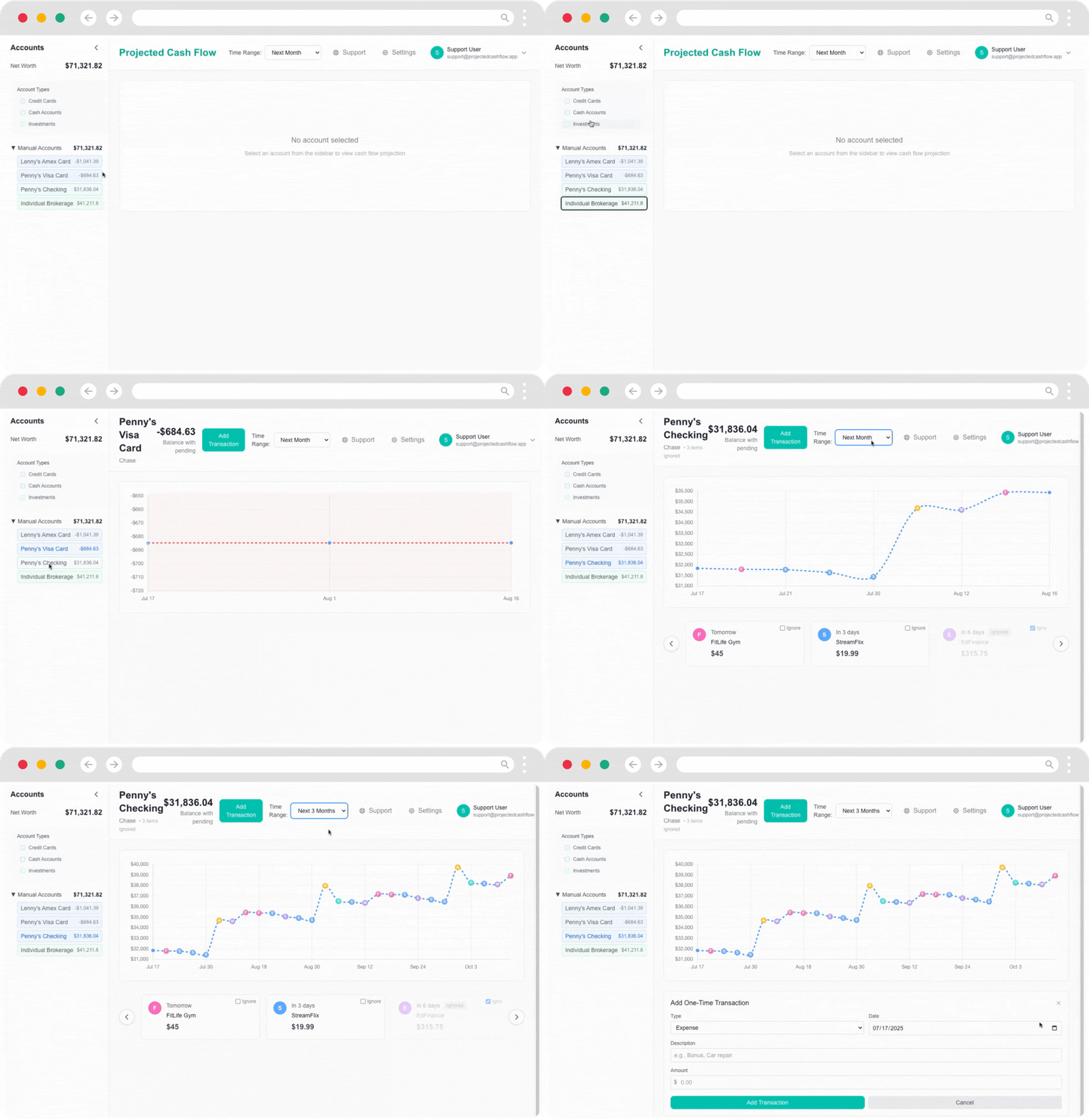
The “Add Transaction” feature is a game-changer for budgeting. It allows you to add potential transactions to your future timeline and see their impact right away. But my app does more than just that. It gives you a simple way to chart out your financial future with the ability to add “what-if” scenarios.
Q: How do “What-if” scenarios help users plan for their financial future, and what specific situations can they model with your app?
This type of projected cash flow visualization isn’t currently available in Lunch Money, despite being one of the most requested features. Based on user feedback, Lunch Money members want the ability to plan for major expenses, like vacations, and be able to forecast expected balances based on their scheduled transactions. My app addresses these needs by allowing users to visualize their financial future and make confident decisions about upcoming expenses.
Q: Users of Projected Cash Flow need to provide an Access Token to allow your app to read their data. What does your app do with this token, and how can they be confident that it is stored securely?
I work as a Systems Engineer, focused on infrastructure automation. I’ve enjoyed diving into various APIs and developing middleware that connects different systems. I genuinely love this kind of work. I started my career in the days of Netware 3.12 and the Y2K era (not to be confused with Windows 2000). Through managing large, complex systems, I’ve developed a solid understanding of how to handle sensitive data properly.
The API keys are stored in the ApiKey table with a security-first approach. When a user saves their API key through the settings page, it’s encrypted with AES-256-GCM encryption before it’s stored in the database. The raw key is never saved in plaintext.
Each API key has metadata like the provider (currently Lunch Money), an optional user-defined name for easy identification, timestamps, and a foreign key linking it to the user. We use a master key for encryption and generate a unique IV for each key to ensure that they are stored differently. When the application needs to use an API key, it’s decrypted in memory and immediately discarded after use. This ensures that even if someone gains access to the database, they can’t retrieve the actual API keys without also having access to the encryption key, which is stored separately in the environment configuration.
Q: After the initial free trial period, will users of Projected Cash Flow need to pay a subscription fee to access it?
I’m considering starting pricing at $4.99/month for the app. My priority is to make the current features rock-solid before adding more, though I plan to expand the app’s capabilities over time.
I’m drawn to Lunch Money’s ‘Set Your Own Price’ model and might adopt it in the future—it would give me immediate feedback on whether people find real value in what I’ve built. I’m not expecting this app to fund my retirement, but it would be nice if it could at least cover the expenses of running and maintaining it.
This approach would allow users who find tremendous value in cash flow forecasting to pay what it’s worth to them, while still keeping it accessible for those with tighter budgets who could benefit from better financial planning tools.
Q: Is there anything you’d like to ask the LM user community for?
I’d love for the community to try Projected Cash Flow and provide their honest feedback.
If you love it … maybe I can get a testimonial. If you hate it… Tell me why, I’m GenX, so I have some pretty thick skin.
If it’s too expensive, what would make it worth it to you?
Thanks David. This seems like an awesome tool to help users plan for the future!
Join the discussion! 💬
If you’d like to join the community discussion, check out the dedicated Discord channel:
If you’d like to connect with David, here are the ways you reach him:
Results from our June survey! 🗳️
Last month, we asked you to share your biggest budgeting challenge at the moment. Here are the top results!
- 🪙 Tracking Irregular Expenses: 45.8%
- 🪙 Sticking to my budget every month: 25%
- 🪙 Remembering to categorize transactions: 8.3%
- 🪙 Managing shared expenses with a partner/family: 4.1%
- 🪙 Taking time to properly categorize and reconcile my budget: 4.1%
- 🪙 I love the tool but don’t need a budget. It hurts me: 4.1%
- 🪙 Having any money to budget 🙃: 4.1%
Calling all Financial Coaches!
Are you a financial coach who loves using Lunch Money? We’re exploring a certification program that can help you to find more clients to guide you to financial success using Lunch Money. For more details, please visit the page below and join the waitlist to be the first in line when we launch!
Connect with us on social media!
In the last 5 years, grocery prices have gone up 25%, depending on where you live. But your food budget doesn’t have to follow this trend.
If you’re looking for ways to save on groceries, check out the latest YouTube video from Lunch Money financial coach Jacob Wade!💡

We’d love to connect with you on social media. Find us on the following platforms:


Do you have a story or idea? 💭
We’d love to feature more community stories in our newsletter!
👉 Do you have an interesting story about using Lunch Money that you’d like to share? Have you built a cool app, plugin, or tool you’d like to share with the Lunch Money community? Are there topics you’d like to see us explore in future issues of the Community Newsletter?
Please reach out to JP by email at jp@lunchmoney.app!