posted on September 29, 2026 by Jen
Community Newsletter #27
 COMMUNITY
Issue 27 · September 2026
COMMUNITY
Issue 27 · September 2026
“You don’t necessarily need years of development experience. A little patience, curiosity, and willingness to experiment can take you surprisingly far.”
JP Shipherd · Developer Advocate at Lunch Money · Albany, New York
In this issue
01 · Spotlight interview
Meet JP Shipherd, Lunch Money’s Developer Advocate
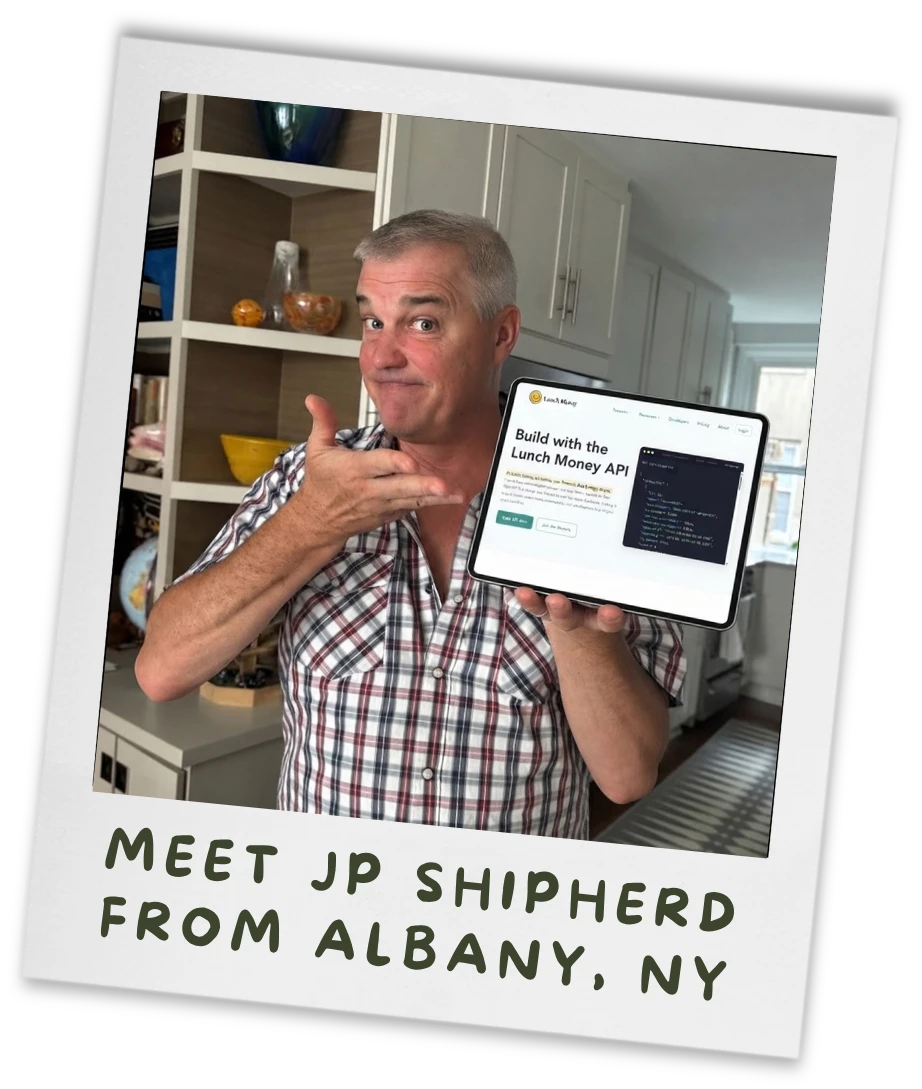
Jen here, taking over the Community Spotlight this month! I’m interviewing our very own JP Shipherd, Lunch Money’s Developer Advocate, who usually writes this newsletter.
It’s a great time to put JP in the spotlight. After several years of work, our v2 API is now available to everyone, our new Developer Portal is live, and the rise of AI and community-built projects is opening up new ways for people to use Lunch Money.
I sat down with JP to talk about the work behind all of this, what a Developer Advocate actually does, and some of the things our community is already building with Lunch Money!
How did you first find Lunch Money?
Like many Lunch Money users, I came here after Mint announced it was shutting down. One thing that attracted me to Lunch Money was its API.
I had visualizations that I originally built for my Mint data, and the API allowed me to keep using them with Lunch Money. As I used the product and built more tools, I became involved in the Discord community. I shared what I was creating, traded ideas and best practices with other developers, and tried to help both developers and everyday Lunch Money users when I could.
That community involvement ultimately led to my role at Lunch Money.
How did you go from community member to Developer Advocate?
There is a funny story behind that.
Not long after I subscribed, Jen posted that she was looking for a part-time product manager. By the time I saw the post, she had already hired someone, but I emailed her anyway. I told her about my background in product management and developer ecosystems and offered to help.
I did not hear back, which was perfectly reasonable. Lots of people email Jen! I continued participating in the Discord community, and several months later she posted another opening, this time for a customer success role. I decided to throw my hat into the ring and spent some time writing an email explaining why I thought I would be a good fit.
Just as I hit send, I discovered that Jen had emailed me at almost exactly the same time. She wanted to talk about her plans to invest in Lunch Money’s developer ecosystem.
When we eventually spoke, I told her that Developer Advocate was the role that interested me most. That title describes what I try to do every day: advocate for developers and help make Lunch Money the most useful platform possible for people who want to work with their financial data.
It worked out well for everyone. Din became our Customer Success Manager, and Lunch Money users know just how fantastic he is!
What does a Developer Advocate do?
My favorite part of the role is interacting with people who are building something with the Lunch Money API.
I review the apps and projects community members submit, and I talk through API questions by email or in the developer channels on Discord. I also keep an eye on the projects people share in Show ’N Tell and the growing collection of awesome community projects.
Those conversations inform everything we do. We try to make proposed API designs available for community review before making them official. Direct feedback about our designs, missing features, and real-world use cases help us decide what to improve and which part of the platform to tackle next.
The v2 API does not yet cover every aspect of Lunch Money, so that conversation remains especially important. Lately, I have also been working with the team on one of our most requested developer features: OAuth. Stay tuned for more information!
How did the v2 API project begin?
Jen built the first version of the Lunch Money API, but as a one-person company, she couldn’t always find time to maintain the documentation while also building new features and improving the product.
When I joined Lunch Money with a dedicated focus on the developer ecosystem, we had an opportunity to think about what a new version of the API could look like. We decided to build v2 around OpenAPI, a widely used standard that helps keep an API and its documentation aligned while giving us access to a much broader set of developer tools.
OpenAPI and the tools built around it gave us an opportunity to take a different approach with v2. We wanted a design-first API, and we tapped into our developer community for continuous feedback as we shaped and improved it.
Pursuing v2 also gave us an opportunity to expand what the API could do, make it more consistent, and create a better overall experience for developers.
We couldn’t have imagined how much the new API would unlock. We had these conversations before today’s generation of AI tools took off. We thought we were building a better experience for developers, but we didn’t realize how valuable that foundation could become for everyone else.
How might someone with no technical experience start playing with the API?
A great place to start is our mock API service. It lets you explore v2 and see how the API works without connecting any of your real financial data. We originally built the mock service while designing v2, but it’s become a useful way for anyone curious about the API to experiment in a low-risk environment. You can explore realistic data and get a feel for what’s possible before you work with your own Lunch Money account.
What can you do with the Lunch Money API?
The API gives you the flexibility to build new ways to interact with your Lunch Money data, from complete alternative interfaces to smaller tools designed for a specific purpose.
We’ve seen community members create entirely new interfaces for managing their Lunch Money experience, such as Bento Cash Web (source code).
Others have built much more focused tools. Including lunchwidget and Leftover Lunch Money, Android and iOS widgets that give you at-a-glance information to help you see whether you can spend something right now.
One of my new favorites is Dopo (source code), which gamifies categorizing transactions. You can find even more examples on the Lunch Money Developers page.
With the new Developer Portal, the v2 API, and today’s AI-assisted tools, many more people can build something personal. You don’t necessarily need years of development experience. A little patience, curiosity, and willingness to experiment can take you surprisingly far.
What comes next?
Plenty of work remains. We want to expand the parts of Lunch Money covered by the API, continue improving the developer experience, and make it easier for people to discover what others have built.
My biggest personal challenge may be education. Our community is producing remarkable projects, but people need to know where to find them. They also need approachable examples that show what is possible, even if they do not consider themselves developers.
That is why I am starting a new newsletter called Building with Lunch Money. It will focus on community projects, practical ways to use the API, and the new possibilities AI and MCP are opening up. Users who have created a Developer Access Token will receive the first issue via email next month and can unsubscribe easily. Curious non-developers are warmly invited as well: sign up for Building with Lunch Money. Of course, it will also be posted on the Lunch Money blog.
The rest of the team will also be contributing more to the existing Community Newsletter, which will continue celebrating every aspect of the Lunch Money community. Building with Lunch Money will give us a dedicated place to go deeper on the developer ecosystem without turning every Community Newsletter into an API newsletter.
Thanks JP, and thanks to everyone in the Lunch Money community whose questions, feedback, experiments, and projects helped shape the V2 API! The most rewarding part of this work is seeing people use Lunch Money in ways we never would have imagined on our own.
02 · Start building
Where to start with the v2 API
There are plenty of ways to explore what’s possible with Lunch Money and see what other community members are building:
- Explore the new Lunch Money Developer Portal
- Dig into the v2 API reference
- Browse awesome Lunch Money community projects
- Visit Show ’N Tell on Discord to see what others are making.
If you’ve created something of your own, add it to our list of awesome projects. And if you’re just beginning to wonder what you might make, join the developer community and ask questions. Curiosity is enough to get started.
03 · From the community
Tell PCMag what you think of Lunch Money
A Lunch Money user shared PCMag’s 2026 Readers’ Choice survey. If you use Lunch Money, feel free to leave an honest rating. It only takes a few minutes, and you’ll be entered into a drawing for a $250 Amazon gift card.
04 · From the founder
Follow along behind the scenes
How a company is funded can shape what it builds and who it listens to. In a recent post, I shared how bootstrapping influences the way Lunch Money makes decisions, builds its product, and stays focused on its users.

For more behind-the-scenes updates on everything from building Lunch Money to life as a bootstrapped founder, follow along on LinkedIn, TikTok, and Instagram.
05 · From the team
Sign up together and save
Have friends, family members, or a group who want to get better with their money? With Lunch Money for Organizations, you can all use Lunch Money together while paying less!
Groups of five or more can get Lunch Money for $55 per person per year. One person organizes and pays for the group, and everyone gets their own private Lunch Money account to manage their finances independently.

06 · From the blog
How to reset your budget after a bad money month
Had a bad budgeting month? Don’t be discouraged!
Budgeting is a skill, and like any skill, it improves with time and effort. Focus on progress, not perfection, and strengthen your emergency fund so the next setback stings less. Every reset gives you a stronger foundation for the future.
In this blog post, learn practical ways to reset your budget after a rough month, from figuring out what went wrong to adjusting your spending plan and preparing for irregular expenses.

Thanks for reading, and for being part of the Lunch Money community!
Jen
Founder of Lunch Money