| ~ $ building --with lunch-money |
# issue 01 |
|
| |
|
Settings endpoints arrive in v2.11.1, and TRMNL now displays your primary currency
|
|
Welcome to the first edition of Building with Lunch Money, a periodic update sharing practical tips on using the Lunch Money API, community use cases, and other news surrounding the developer ecosystem.
|
|
This newsletter is not just for developers. AI is making it easier to work with an API without technical knowledge. If you’re curious about what’s possible, our blog post explaining what an API enables and our guide to using the Lunch Money API with AI are both good places to start.
|
|
You are receiving this because you generated a Lunch Money API token at some point. If you would rather not receive these updates, you can unsubscribe at any time.
|
|
|
|
# changelog
|
|
New in v2.11.1: Settings Endpoints
|
$ git diff v2.11.0..v2.11.1
+ GET /me/account/settings
+ PUT /me/account/settings
+ GET /me/user/settings
+ PUT /me/user/settings
+ GET /me/user/account/settings
+ PUT /me/user/account/settings
~ GET /budgets/settings # schema now public
~ budget_period_quantity # number → integer |
|
|
Version 2.11.1 gives developers access to the settings that shape a user's Lunch Money experience. Apps can now read and update account settings, user preferences, and user-specific settings within a budgeting account.
|
|
That might sound like a small change, but it removes a lot of guesswork for developers building tools such as custom clients and dashboards. An app can use the same date and currency formatting as Lunch Money, understand how a user's budget periods work, and respect preferences such as whether pending transactions are included in totals.
|
|
In short, community-built tools can feel more like a natural extension of a user's Lunch Money setup, rather than imposing their own assumptions.
|
|
The new endpoints separate settings by who and what they affect.
|
|
Budgeting Account Settings
|
|
GET /me/account/settings and PUT /me/account/settings provide access to settings shared by everyone collaborating on the same budgeting account, including: | > | Primary and supported currencies | | > | Budgeting account display name | | > | Locale used to format numbers and currency | | > | Preferences for automatically creating category and suggested transaction rules | | > | Whether pending transactions are included in account totals |
|
|
For example, a third-party dashboard can use the budgeting account’s preferred locale and currency settings to display totals and dates.
|
|
User Settings
|
|
GET /me/user/settings and PUT /me/user/settings cover display and formatting preferences that follow a user across the budgeting accounts they own or collaborate on, including: | > | Date formats and the first day of the week | | > | 12-hour or 24-hour time | | > | Whether dates always display the year or weekday | | > | Whether the Lunch Money app displays debits as negative amounts | | > | Whether payee suggestions appear when entering transactions |
|
|
One important detail for API builders: the debit display preference tells apps how the user wants amounts to be displayed. It does not change the API's sign convention, especially important when creating new transactions or updating account balances. See our Guide to Amounts and Balances for more details.
|
|
User Account Settings
|
|
GET /me/user/account/settings and PUT /me/user/account/settings cover preferences that apply to one user for one particular budgeting account, including: | > | Whether manually created or edited transactions are automatically marked as reviewed | | > | The default account shown when manually creating a transaction in an app. |
|
|
Note that transactions created via the API still require an explicit account ID to be assigned, regardless of the default account. Without one, they are considered cash transactions.
|
|
These user account settings are especially useful for budgeting accounts with collaborators. A client can preserve each person’s workflow without changing the experience for everyone else sharing the account.
|
|
Budget Settings
|
|
The response schema for GET /budgets/settings is now part of the public API documentation. It describes the budgeting account’s period configuration and related display behavior, including period granularity, quantity, anchor date, and rollover settings.
|
|
This makes it easier to build accurate calendar-based budget views without assuming every budget is monthly or begins on the first day of the month.
|
|
As part of this update, budget_period_quantity is now documented as an integer.
|
|
|
|
# quickstart
|
|
Try it in 30 seconds
|
|
You don't need an access token or a real budget to play around with the new settings endpoints. Our mock server returns sample data to any request, so you can try it straight from the API reference. Hit “Test Request” on any of the new settings endpoints, ensure the API server is set to https://mock.lunchmoney.dev/v2 and send the request!
|
|
You'll get back something like this:
|
{
"primary_currency": "usd",
"supported_currencies": [
"usd",
"cad",
"jpy"
],
"display_name": "🏠 Family budget",
"locale": "en-US",
"auto_create_category_rules": true,
"auto_create_suggested_transaction_rules": true,
"include_pending_in_totals": true
} |
|
Ready for real data? Switch the server to https://api.lunchmoney.dev/v2 and create a token on your developers page. Get your API token → |
|
|
|
|
# heads-up
|
|
A note about updating settings
|
|
The new settings endpoints can change how the official Lunch Money web and mobile apps behave. Only call the update endpoints when your tool truly needs to change something. When you do change a setting, let the user confirm it first.
|
|
|
|
# in-the-wild
|
|
TRMNL now speaks your currency
|
|
We introduced TRMNL, an ePaper companion that helps you stay focused, back in Community Newsletter #4. Its Lunch Money plugin was recently updated to use the user’s primary currency.
|
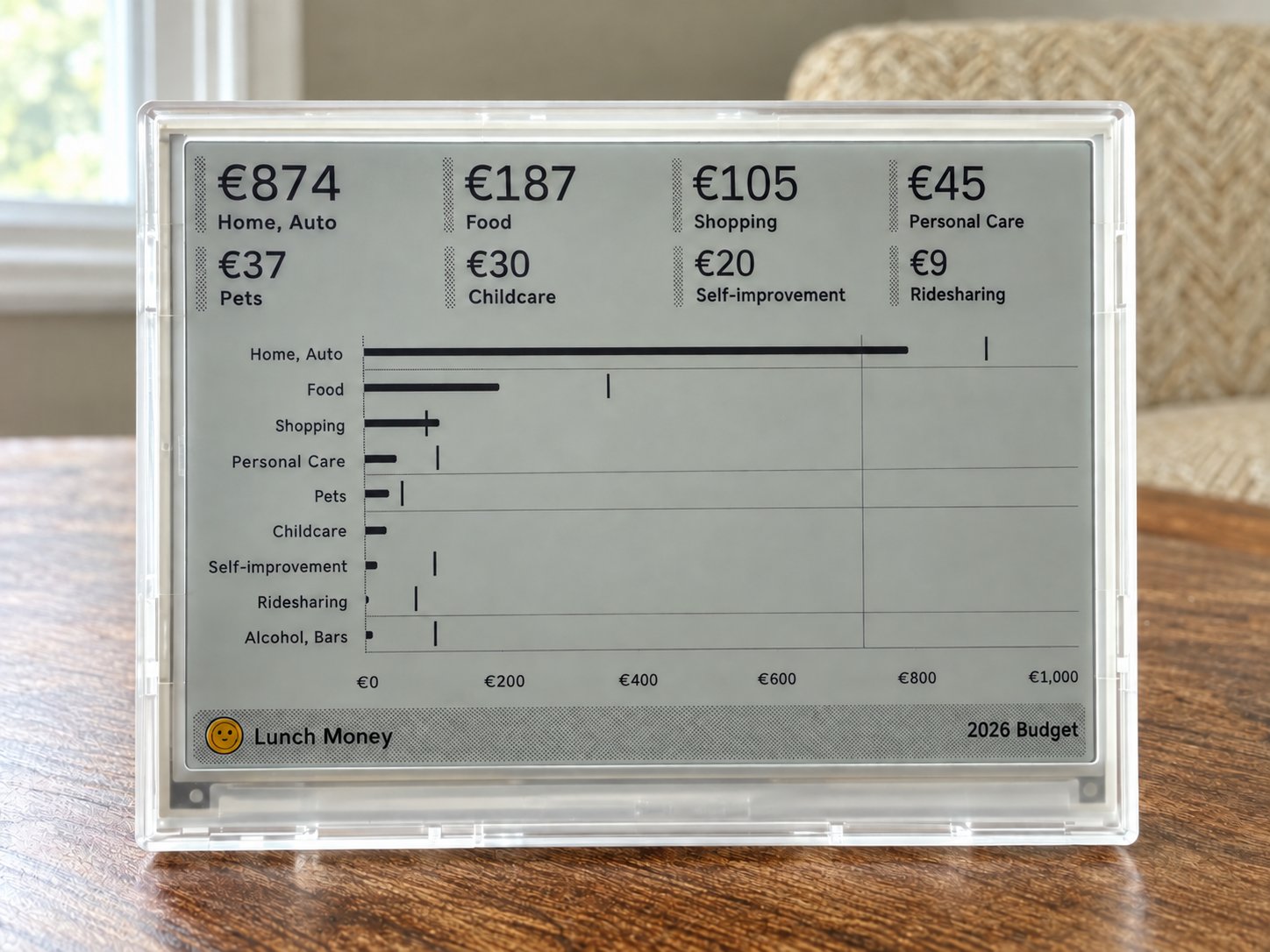 | | # Lunch Money budget on a TRMNL, in the account's primary currency |
|
|
|
Interested Lunch Money users can use code lunchmoney-25 to get $25 off when they order a new TRMNL device before October 31.
|
|
|
|
# feedback
|
|
We want to hear from you
|
|
Have you built something with the Lunch Money API? Are you experimenting with an MCP server or using AI to explore your finances? Is there a developer topic you’d like us to explain in plain language?
|
|
Reply to this email with your project, question, tip, or idea. If you’ve built something you’d like us to cover in a future edition, we’d love to hear about it!
|
|
|
 |
|
Thanks for reading!
– JP from Lunch Money
Developer Advocate
|
|
Find us on the following platforms: |
|